
Settings
Your business details, delivery fees, printing, policies, and your plan and billing.
On this page
Settings has eight tabs: Business, Invoice, Team, Couriers, SMS, Online stores, Activity log and Plan & billing. This page covers Business and Plan & billing. The others have their own pages: Invoice, Team, Couriers, SMS, Online stores, Activity log.
Business#
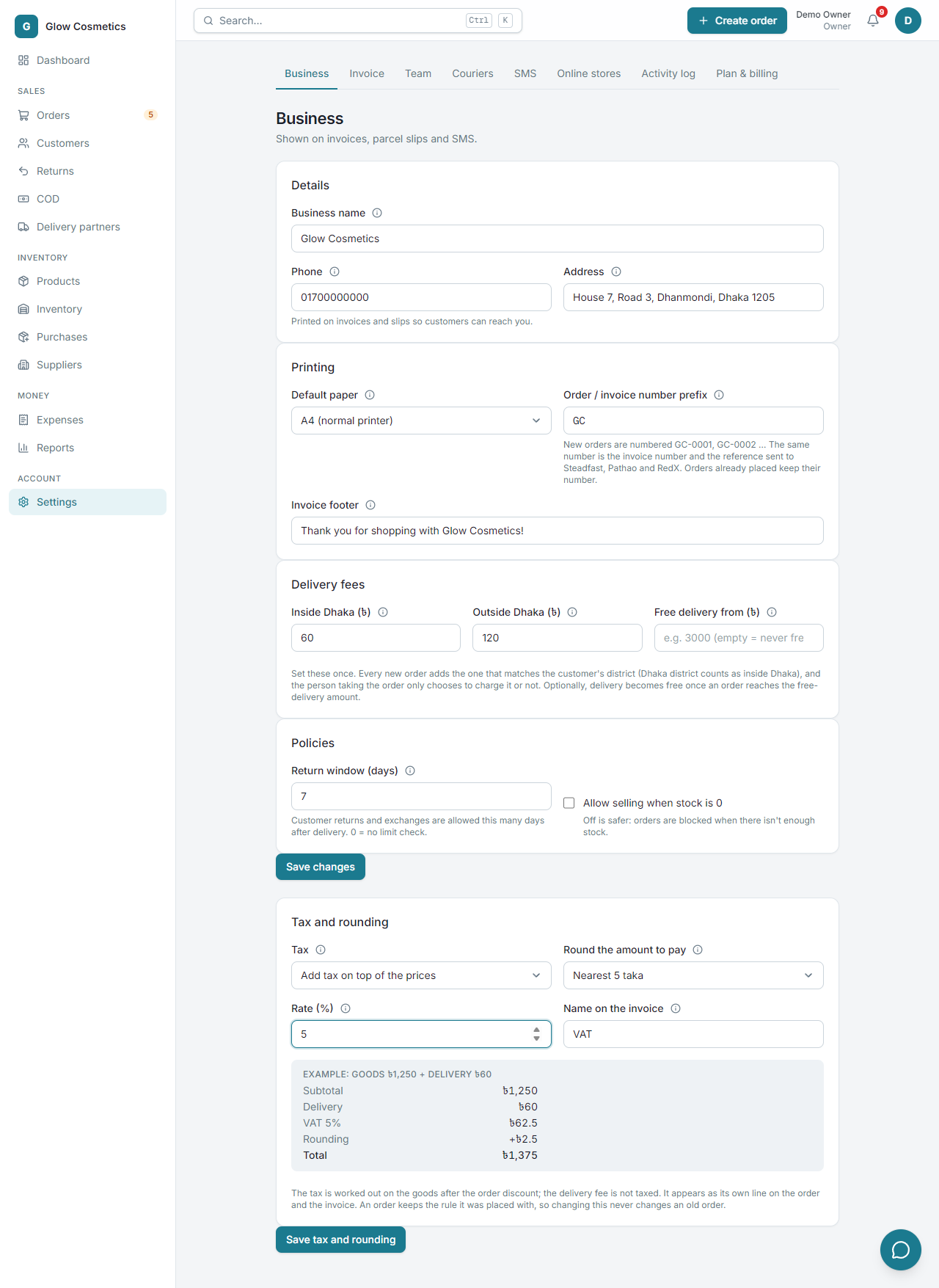
The Business tab holds what is printed on your invoices, parcel slips and SMS, and a few rules for your orders. Only owners and admins can change it.
Details#
- Business name, Phone and Address: printed on invoices and slips so customers can reach you.
Printing#
- Default paper: A4 (normal printer), 80 mm thermal printer or 58 mm thermal printer.
- Order / invoice number prefix: the letters in front of your order numbers (for example GC gives GC-0001, GC-0002 ...). The same number is the invoice number and the reference sent to Steadfast, Pathao and RedX. Orders already placed keep their number; only new orders use a new prefix.
- Invoice footer: one line at the bottom of every invoice, for example Thank you for shopping with Glow Cosmetics! It is the thank-you note until you design your invoice in the Invoice tab, where you can change the whole look (see Design your own invoice).
Delivery fees#
Set these once. Every new order adds the one that matches the customer's district, and the person taking the order only chooses to charge it or not.
- Inside Dhaka (৳) and Outside Dhaka (৳). Dhaka city counts as inside; Savar, Keraniganj and the other upazilas count as outside.
- Free delivery from (৳): leave empty for Never, or type an amount above which delivery is free. It is judged on the products after discounts.
Policies#
- Return window (days): how many days after delivery a customer may return or exchange something. 0 means no limit.
- Allow selling when stock is 0: off is safer, because orders are blocked when there is not enough stock.
Press Save changes.
Tax and rounding#
If you charge VAT (or another tax), set it once here, in its own box with its own Save tax and rounding button.
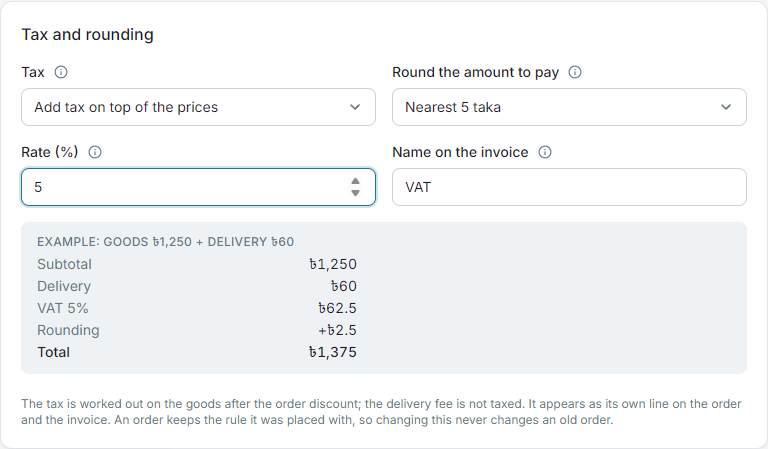
- Tax: No tax, Add tax on top of the prices (the tax is added to the total) or Prices already include tax (the tax is shown on the invoice, but the total does not change).
- Rate (%) and Name on the invoice (for example VAT).
- Round the amount to pay: to the nearest taka, 5 taka or 10 taka, or not at all. The difference shows as its own Rounding line, so the invoice always adds up.
The example box shows what an order of ৳1,250 plus ৳60 delivery becomes as you change the settings. The tax is worked out on the goods after the order discount; the delivery fee is not taxed.
Plan and billing#
Every plan has every feature. Plans differ only in how many orders a month and how many team members.
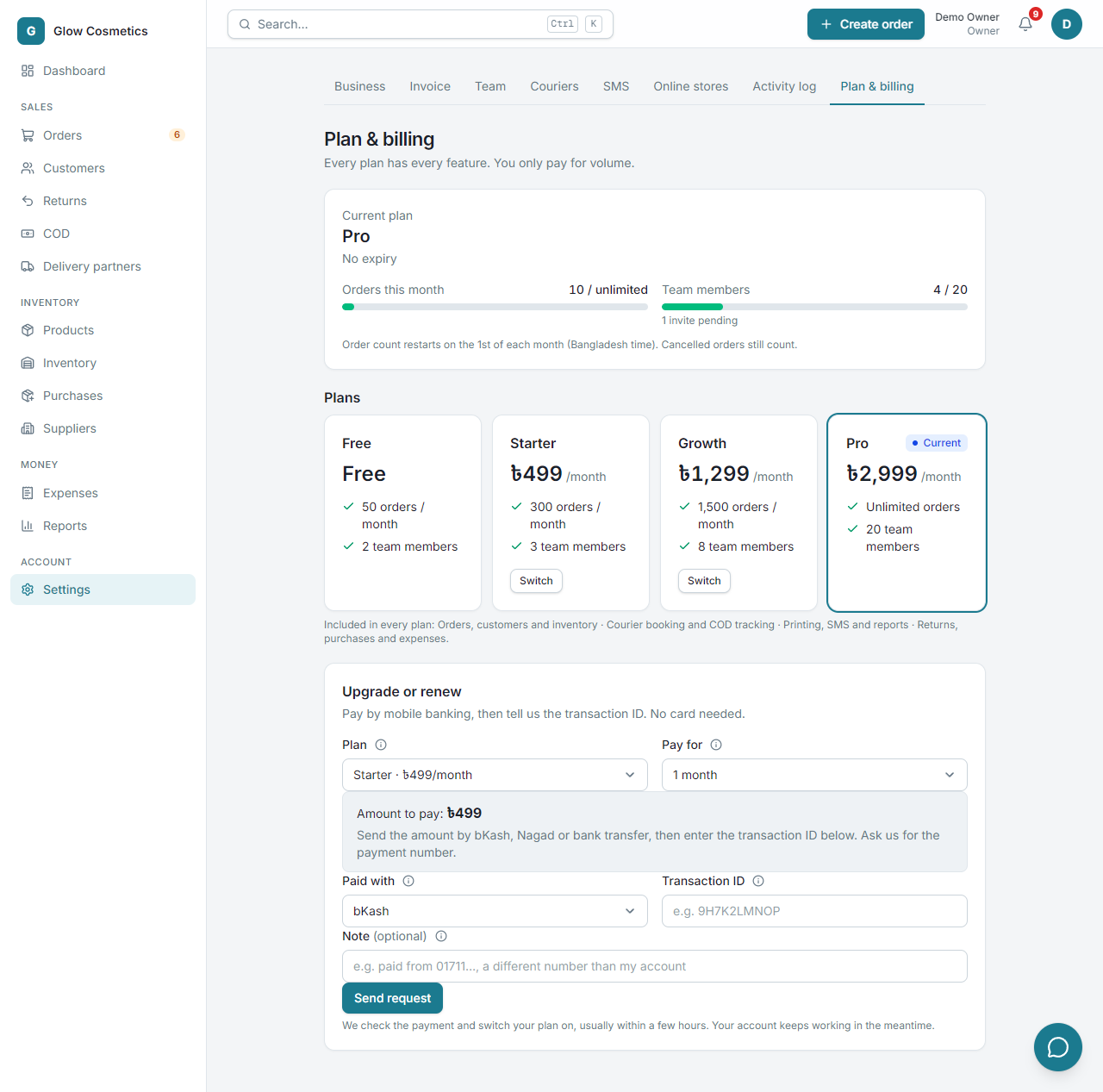
| Plan | Price | Orders per month | Team members |
|---|---|---|---|
| Free | Free | 50 | 2 |
| Starter | ৳499 / month | 300 | 3 |
| Growth | ৳1,299 / month | 1,500 | 8 |
| Pro | ৳2,999 / month | Unlimited | 20 |
At the top you see your Current plan, how many orders you used this month, and your team seats. The order count restarts on the 1st of each month (Bangladesh time). Cancelled orders still count.
Upgrade or renew#
- Under Upgrade or renew choose the Plan and how long to Pay for (a year costs ten months).
- Send the Amount to pay by bKash, Nagad or bank transfer.
- Choose Paid with, type the Transaction ID and an optional Note.
- Press Send request.
We check the payment and switch your plan on, usually within a few hours. Your account keeps working in the meantime.