
Your profile
Your name, mobile number and picture, and the businesses you belong to.
Click your round picture (top right) and choose My profile.
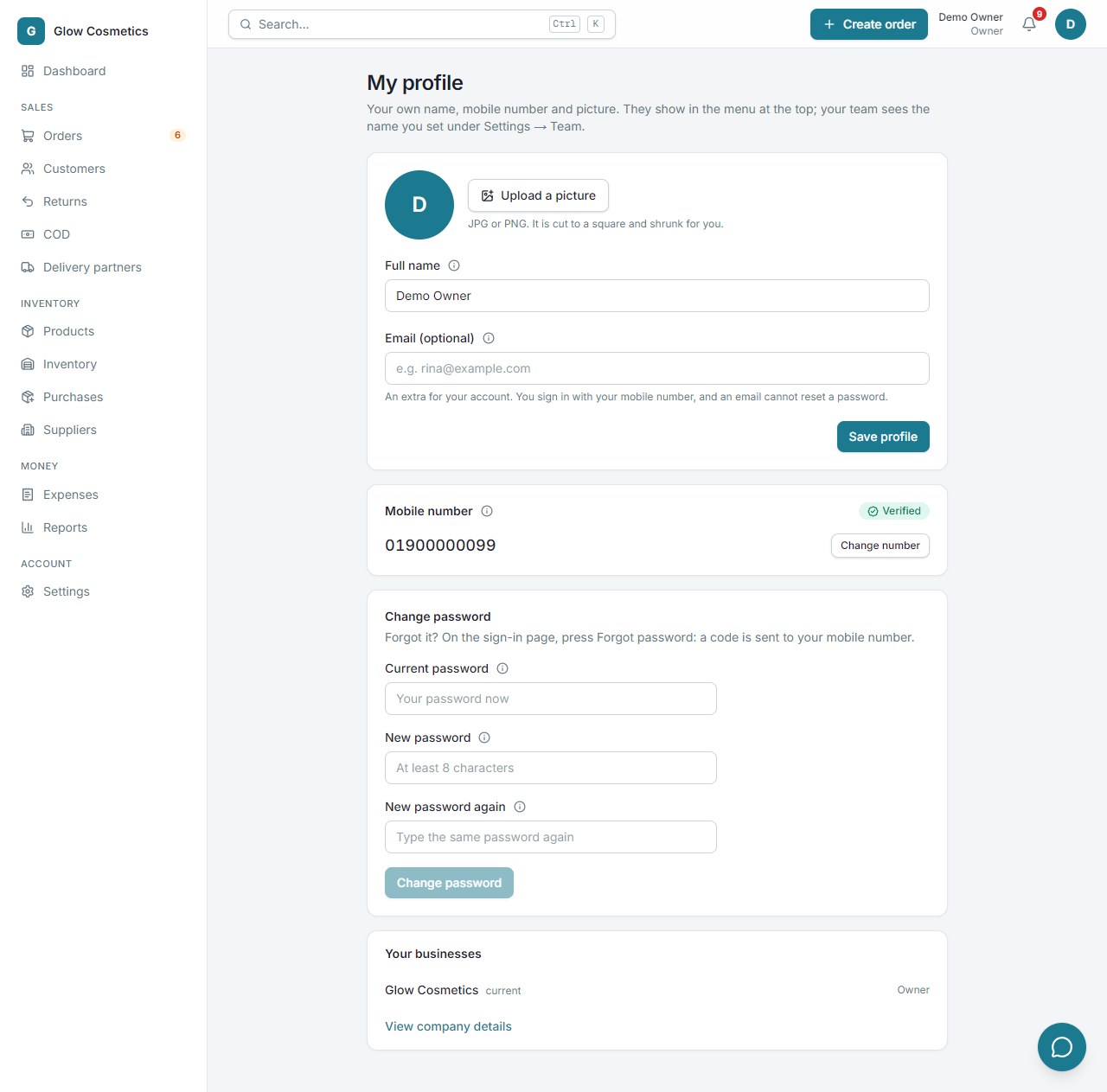
Change your details#
- Press Upload a picture to add a photo (JPG or PNG). It is cut to a square and shrunk for you.
- Type your Full name.
- Press Save profile.
Change your password#
In Change password type your current password and the new one twice. Your other signed-in devices stay signed in until their session ends. If you have forgotten the password, use Forgot password on the sign-in page instead: a code is sent to your verified mobile number.
Your mobile number#
Below your details is the Mobile number box. It shows Verified (green) or Not verified (yellow).
- Not verified: type your number, press Send code, then type the 6-digit code from the SMS. After that it is yours: you can sign in with it.
- Verified: to use another number, press Change number, type the new one and its code. The old number stays until the new one is proved. A number can belong to only one account.
The number is never typed over like a name: it only changes by proving it with a code.
Your name and picture show in the account menu and next to it in the top bar. Your Email is optional: it is kept as an extra for your account, but it cannot be used to sign in or to reset a password. You always sign in with your mobile number.
Your businesses#
Your businesses lists every business you belong to and your role in each. The one you are in now is marked current. Owners and admins also get View company details.