
Cash on delivery (COD)
Where your cash is: with the rider, with the courier, or paid out to you. Mark payouts and keep your books straight.
When a customer pays on delivery, the cash first goes to the rider, then to the courier, and only later to you. The COD page shows where every taka is.
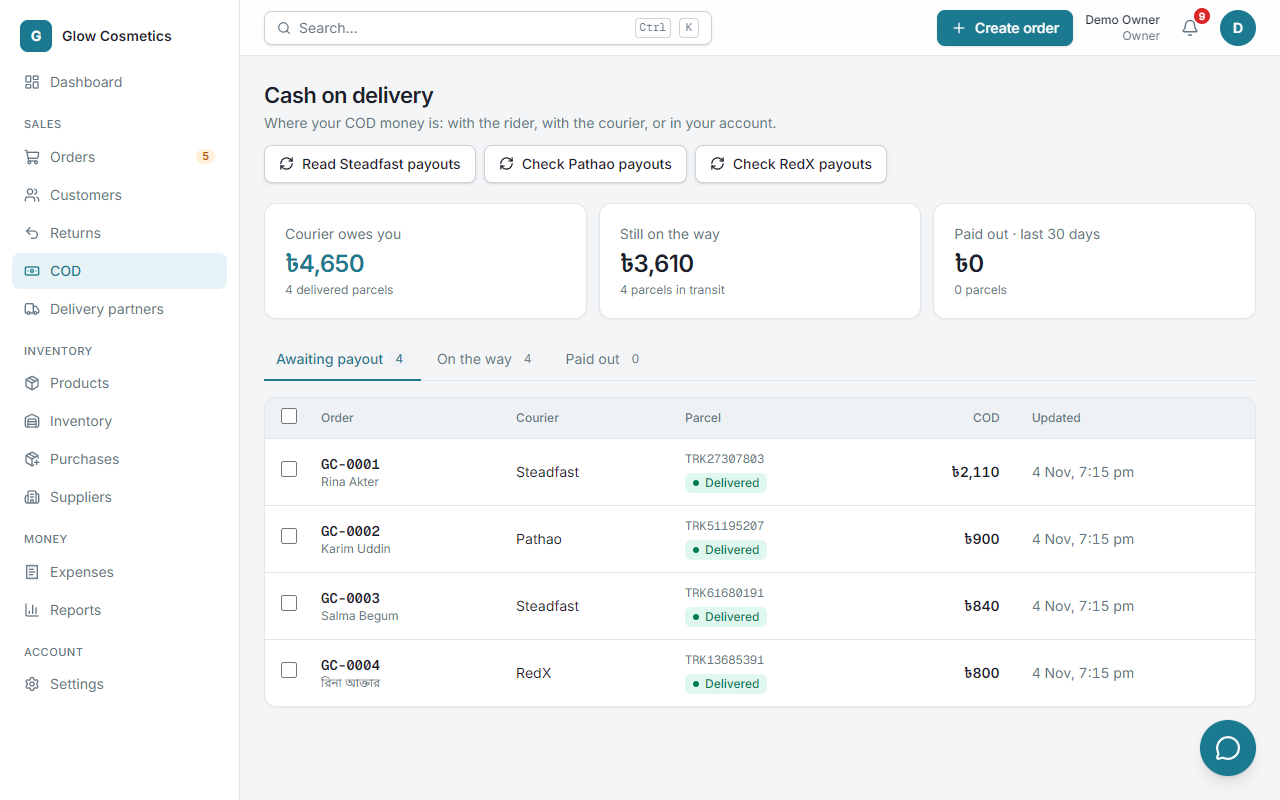
The three numbers#
| Card | Meaning |
|---|---|
| Courier owes you | Parcels already delivered, but the courier has not paid you for them yet. |
| Still on the way | The cash value of parcels still in transit. |
| Paid out · last 30 days | What couriers have paid you in the last 30 days. |
The three tabs#
- Awaiting payout: delivered parcels waiting for the courier's payment. This is the list to check against your courier statement.
- On the way: parcels in transit.
- Paid out: parcels you have been paid for.
Each row shows the order, the courier, the tracking code, the COD amount and when it was last updated. The amount is the cash actually collected, which Steadfast can report exactly through instant updates.
Mark parcels as paid out#
When the courier pays you (to bKash or the bank):
- Open Awaiting payout.
- Tick the parcels that the payment covered (or the box in the header to tick all).
- Press Mark as paid out and confirm.
The money moves to the Paid out tab.
Steadfast: let it do the work#
Press Read Steadfast payouts. Enpod reads your Steadfast payments, and marks the parcels each payout covers as paid out, with the payout reference. You do not need to tick boxes.
Pathao and RedX: paid out, parcel by parcel#
Pathao and RedX do not publish a list of payouts, but each tells you, parcel by parcel, when the cash on delivery has been paid out to you: Pathao shows the status Paid (with the number of the payment invoice), and RedX shows paid. Enpod reads that and marks the parcel as paid out for you:
- By itself. Delivered parcels that are still awaiting payout are checked every few hours, and at once if the courier sends an instant update.
- When you press the button. On the COD page press Check Pathao payouts or Check RedX payouts. Enpod asks the courier about each parcel waiting for its payout and marks the paid ones. The message tells you how many were paid and how many are not paid yet.
- From one order. On a delivered parcel with cash on delivery, Refresh status on the order page checks that one parcel.
A Pathao payment invoice number is saved with the parcel and shown on the Paid out tab (Payout 7788). Parcels of the same invoice are added up as one payout. RedX does not give a payment number.
Why this matters#
Courier owes you is real money that is not in your account yet. It also feeds the dashboard's COD to receive line, so you see it every day. Revenue in the profit report counts when an order is delivered, not when the courier pays you.